Data Warehouse Data Model Design Example: Your Ultimate Guide With Real-World Templates
Have you ever stared at a mountain of raw business data, wondering how to transform it into a single source of truth that actually works for your analysts and executives? You're not alone. The journey from chaotic operational data to a powerful, queryable data warehouse hinges on one critical, often underestimated phase: data model design. A poorly designed model leads to slow queries, confusing schemas, and frustrated users. A well-designed one, however, unlocks the true potential of your analytics investment. But what does a good data warehouse data model design example actually look like in practice?
This guide dives deep beyond theory. We'll walk through concrete, actionable examples of the most prevalent data modeling methodologies—Star Schema, Snowflake Schema, and Data Vault—using a relatable, universal business scenario: an e-commerce company. You'll see visual representations, learn the precise rules for constructing each model, understand their trade-offs, and gain the clarity needed to choose and implement the right approach for your organization's unique needs.
The Foundation: Why Your Data Model Choice Is Everything
Before we dissect examples, let's establish why this decision is paramount. Your data model is the architectural blueprint of your data warehouse. It defines how tables relate, how facts are measured, and how dimensions describe business entities. This structure directly determines:
- Query Performance: A star schema with denormalized dimensions can be dramatically faster for complex analytical queries than a highly normalized transactional model.
- User Empowerment: A intuitive, business-friendly model allows business analysts (not just data engineers) to explore data independently.
- Data Integrity & Scalability: The model governs how you handle slowly changing dimensions, historical tracking, and the ingestion of new data sources.
- Development & Maintenance Cost: A clear, consistent model reduces long-term development time, documentation overhead, and the risk of errors.
According to a 2023 survey by TDWI, organizations with a formal, well-communicated data modeling standard report 40% faster time-to-insight for new analytics projects and significantly lower data preparation costs. The model isn't just a diagram; it's the operational DNA of your analytics environment.
The Star Schema: The Workhorse of Analytics (With Example)
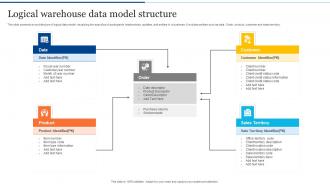
The Star Schema is the most common and intuitive design for data warehouses. It's called a "star" because its diagram resembles a star: a central Fact Table surrounded by multiple, denormalized Dimension Tables.
Core Components: Facts and Dimensions
- Fact Table: The heart of the star. It contains quantitative, additive measures (e.g.,
sales_amount,quantity_sold,profit) and foreign keys that link to dimension tables. It's typically the largest table and represents business processes (e.g., "Sales," "Inventory"). - Dimension Tables: These provide the context for the facts. They contain descriptive, categorical attributes (e.g.,
product_name,category,customer_region,order_date). They are denormalized, meaning they contain redundant data to avoid costly joins. Each dimension has a primary key (a surrogate key, likeproduct_key) that the fact table references.
Real-World E-Commerce Star Schema Example
Let's model our online store's sales.
1. Fact Table: fact_sales
| Column Name | Data Type | Description |
|---|---|---|
sale_key | INT (PK) | Surrogate key for the fact record. |
date_key | INT (FK) | Links to dim_date. |
product_key | INT (FK) | Links to dim_product. |
customer_key | INT (FK) | Links to dim_customer. |
store_key | INT (FK) | Links to dim_store. |
sales_quantity | INT | Number of units sold. |
sales_amount | DECIMAL(10,2) | Total revenue (price * quantity). |
discount_amount | DECIMAL(10,2) | Total discount applied. |
net_sales | DECIMAL(10,2) | Calculated: sales_amount - discount_amount. |
2. Dimension Table: dim_product (Denormalized)
| Column Name | Data Type | Description |
|---|---|---|
product_key | INT (PK) | Surrogate key. |
product_id | VARCHAR | Source system product ID. |
product_name | VARCHAR | |
product_category | VARCHAR | Denormalized: No join to a separate category table. |
product_subcategory | VARCHAR | Denormalized. |
brand | VARCHAR | |
list_price | DECIMAL(10,2) | Current standard price. |
is_active | BOOLEAN |
(Similar denormalized tables exist for dim_date, dim_customer, dim_store)
Why This Works: To answer "What were net sales for 'Electronics' in 'Q4 2023' in the 'New York' store?", the query joins fact_sales to just four tables. The denormalization in dim_product means product_category is right there—no need to join a separate dim_category table. This simplicity is the star schema's superpower for read-heavy analytics.
Actionable Tips for Star Schema Design
- Use Surrogate Keys: Never use natural/business keys (like a product's SKU) as primary keys in dimensions. Use auto-incrementing integers (
product_key). This allows you to handle changes in the source key and is more efficient for joins. - Grain is King: Define the fact table's grain (the atomic, indivisible business event) first. Ours is "one line item on one sales transaction." Everything else flows from this.
- Add Junk Dimensions: For low-cardinality flags (
is_discount,is_returned,payment_method_type), create a singledim_promotion_flagordim_transaction_typeto avoid cluttering the fact table.
The Snowflake Schema: Normalized Dimensions for Consistency
The Snowflake Schema is a variation where dimension tables are normalized into multiple related tables, creating a structure that resembles a snowflake.
When and Why to Use a Snowflake Schema
You choose snowflaking primarily for:
- Massive Dimension Tables: If a dimension like
dim_producthas hundreds of attributes and is shared by many fact tables, normalizing can save significant storage by eliminating redundant data (e.g., a separatedim_categorytable). - Strict Data Governance: When you need a single, authoritative source for dimension data (like a canonical
dim_suppliertable) that must be updated in one place. - Reducing Update Anomalies: In a denormalized star, changing a product's category name requires updating every product row. In a snowflake, you update it once in
dim_category.
Snowflake Schema Example (Building on Our Star)
Our dim_product from the star gets split:
dim_product (Now a bridge)
| product_key | product_id | product_name | category_key (FK) | brand_key (FK) | list_price | ... |
dim_category (New Table)
| category_key | category_id | category_name | subcategory_key (FK) |
dim_subcategory (New Table)
| subcategory_key | subcategory_id | subcategory_name | department_key (FK) |
Now, to get the category name for a product, you must join fact_sales -> dim_product -> dim_category. This adds complexity.
The Critical Trade-Off: Performance vs. Normalization
The snowflake's benefit (storage efficiency, normalized consistency) is its drawback. Every additional join in a query impacts performance. Modern, columnar MPP (Massively Parallel Processing) data warehouses like Snowflake, BigQuery, and Redshift are optimized for denormalized data. Their compression algorithms make the storage penalty of a star schema negligible. Therefore, the performance cost of extra joins often outweighs the storage savings.
Rule of Thumb: Start with a Star Schema. Only consider snowflaking a dimension if:
- It's truly enormous (billions of rows) and shared by dozens of fact tables.
- Your organization has a non-negotiable requirement for a single version of truth for that dimension that must be maintained separately.
For 90% of use cases, the star is superior.
The Data Vault Methodology: For Agile, Enterprise-Scale Warehouses
Data Vault is a methodology, not just a schema, designed for scalability, flexibility, and historical traceability in large, complex enterprise environments with many changing source systems.
The Three Core Table Types
- Hubs: Contain the unique business keys (natural keys) from source systems. They represent core business entities (e.g.,
hub_customer,hub_product,hub_order). They have a surrogate key (hub_key), the business key (customer_id), and load metadata. - Links: Represent relationships between hubs. They are the fact tables of the model but are generic. A
link_order_productconnectshub_orderandhub_product. Alink_order_customerconnectshub_orderandhub_customer. Links can have their own descriptive attributes (e.g.,quantityin the order-product link). - Satellites: Contain the descriptive attributes (context) for a Hub or a Link. They store all historical changes (using
record_start_date,record_end_date,is_currentflags).sat_customer_detailsholds name, address, email forhub_customer.sat_order_detailsholds order status, shipping method forhub_order.
Data Vault Example: E-Commerce Order
hub_customer: (customer_key,customer_id,load_date,record_source)hub_product: (product_key,product_id,load_date,record_source)hub_order: (order_key,order_id,load_date,record_source)link_order_product: (link_key,order_key(FK),product_key(FK),quantity,load_date)link_order_customer: (link_key,order_key(FK),customer_key(FK),load_date)sat_customer_details: (sat_key,customer_key(FK),name,email,address,load_date,record_end_date,is_current)sat_product_details: (sat_key,product_key(FK),product_name,category,price,load_date,record_end_date,is_current)
When to Choose Data Vault
- You have dozens of source systems feeding the warehouse, with frequent schema changes.
- Auditability and lineage are critical. You must know exactly what data was loaded, from where, and when, for every single attribute.
- You need extreme agility. New business questions? You often just need to add a new satellite or link, not redesign core structures.
- Your team is large and distributed. The strict, automated patterns enable parallel development.
The Downside: Data Vault is complex for end-users. To answer "What were sales for product X?" requires joining a hub, a link, and a satellite. This is typically hidden behind a semantic layer or business vault (a set of star-schema-like views built on top of the raw Data Vault) for analyst consumption.
Comparing the Models: A Decision Framework
| Feature | Star Schema | Snowflake Schema | Data Vault |
|---|---|---|---|
| Primary Goal | Query performance, user simplicity | Storage efficiency, normalized consistency | Enterprise scalability, agility, full lineage |
| Normalization | Denormalized Dimensions | Normalized Dimensions | Highly Normalized (Hubs, Links, Sats) |
| Query Complexity | Low (few joins) | Medium-High (many joins) | Very High (many joins, hidden by views) |
| Historical Tracking | Via Slowly Changing Dimension (SCD) logic | Via SCD logic | Built-in via Satellites (time-series) |
| Schema Changes | Can be disruptive (altering wide tables) | Less disruptive (altering small normalized tables) | Non-disruptive (add new satellite/link) |
| Best For | Most data marts, departmental warehouses, BI-focused environments | Very large, stable dimensions shared across many marts | Large, complex, agile enterprise data warehouses with many source systems |
| User Friendliness | Excellent | Good | Poor (without a semantic layer) |
Practical Recommendation: Most organizations use a hybrid approach. They implement a Data Vault core for raw, auditable data ingestion from sources. On top of that, they build Data Marts using Star Schemas for specific business domains (Sales, Marketing, Finance). This gives them the agility and lineage of Data Vault with the performance and simplicity of stars for their end-users.
Building Your Example: A Step-by-Step Checklist
- Identify Business Processes: What are you measuring? (Sales, Web Clicks, Inventory). Each major process likely gets its own fact table.
- Define the Grain: For the "Sales" process, is the grain "per transaction," "per line item," or "per daily store summary"? This is the single most important decision. Be atomic.
- Identify Dimensions: What are the "who, what, where, when, why" of that grain? (Product, Customer, Time, Store, Promotion). List all descriptive attributes for each.
- Choose a Model & Design:
- For a Star: Create a wide, denormalized table for each dimension. Add all attributes. Use surrogate keys.
- For Data Vault: Identify all unique business keys -> create Hubs. Identify all relationships between hubs -> create Links. Identify all descriptive attributes for each hub/link -> create Satellites.
- Plan for Change: How will you handle a product's category change (SCD Type 2)? How will you track a customer's address history? Your model must specify this.
- Document & Name Convention: Use a strict naming convention (
fact_,dim_,hub_,sat_,_key,_id). Document the grain, source systems, and business rules for every table. - Build a Semantic Layer (Optional but Recommended): For Data Vault or complex stars, use a tool like dbt, Looker, or Power BI Datasets to create business-friendly, pre-joined views that present a star-like interface to analysts.
Common Pitfalls and How to Avoid Them
- Pitfall: Using Transactional (OLTP) Models Directly. Don't simply copy your normalized operational database schema (3NF) into your warehouse. It will perform poorly for analytics.
- Pitfall: Vague Grain Definition. "We track sales." Great, but is that per invoice? Per line item? Per shipment? Ambiguity causes duplicate or missing data.
- Pitfall: Mixing Facts and Dimensions. Don't put transactional comments (a fact-like attribute) in a
dim_customertable. Keep facts additive and in fact tables. - Pitfall: Ignoring Conformed Dimensions. If you have separate "Sales" and "Marketing" data marts, they must share identical
dim_customeranddim_producttables (same keys, same attributes). This is called a conformed dimension and is essential for enterprise-wide reporting. - Pitfall: Over-Engineering. Don't default to Data Vault for a small startup's first warehouse. A simple, well-designed star schema for key business areas is far better than a complex, misunderstood Data Vault.
Conclusion: Your Blueprint for Success
A data warehouse data model design example is more than a theoretical diagram; it's the strategic foundation that dictates the success or failure of your entire analytics initiative. As we've seen, the Star Schema offers unparalleled simplicity and performance for most analytical workloads, making it the ideal starting point. The Snowflake Schema has niche applications for massive, shared dimensions but is often unnecessary on modern cloud platforms. For large, agile enterprises with stringent lineage requirements, Data Vault provides a robust, scalable core, though it requires a semantic layer for user adoption.
The ultimate example is the one that fits your specific context: your data volume, your source system volatility, your team's skills, and your users' needs. Start with a clear, atomic grain definition. Embrace the star for your business-facing data marts. Consider Data Vault only for the complex, raw data integration layer. And above all, document everything and enforce consistent naming conventions. Your future self—and every analyst using your warehouse—will thank you. Now, armed with these concrete examples and frameworks, you can move from asking "what is a data model?" to confidently designing one that turns your data into a true strategic asset.