How Can I Design My Own House Plans? Your Complete DIY Guide To Crafting A Dream Home
Ever stared at a blank plot of land or an existing, lackluster floor plan and thought, “How can I design my own house plans?” That spark of imagination—the vision of sun-drenched rooms, a perfectly flowing layout, and details that scream you—is the first, most crucial step in building a home. While the process might seem daunting, shrouded in the mystery of architects’ drafting tables and complex building codes, designing your own house plans is an increasingly accessible and deeply rewarding journey. This comprehensive guide will demystify every stage, from that initial "what if" to holding a finalized set of plans ready for permits. We'll navigate the balance between creative freedom and technical necessity, providing you with a clear roadmap, essential tools, and the confidence to take the reins on one of life's biggest projects. Whether you're a true beginner or a savvy DIY enthusiast, this is your blueprint for success.
Understanding the Power and Possibility of DIY House Design
What Are House Plans and Why Design Your Own?
At their core, house plans are a comprehensive set of architectural drawings and specifications that serve as the instruction manual for building a home. They detail everything from the overall footprint and room dimensions to structural elements, electrical layouts, and material finishes. Traditionally, this has been the sole domain of licensed architects. However, the rise of powerful yet user-friendly home design software, abundant online resources, and a growing desire for personalized living spaces have empowered homeowners to take a primary role in this creative process. Designing your own plans isn't about replacing an architect for complex structures; it's about actively shaping your environment, ensuring every square foot aligns with your lifestyle, budget, and aesthetic dreams. It transforms you from a passive client into an engaged creator, often leading to a more functional and personally meaningful home.
Debunking Common Myths: It's Not Just for Experts
Many aspiring designers are halted by misconceptions. Myth one is that you need a professional degree in architecture. While formal training provides a deep understanding of structural engineering and advanced drafting, the fundamental task of space planning and conceptual design is within reach for anyone with a clear vision and a methodical approach. Myth two is that it's prohibitively expensive. While hiring an architect for full-service design can cost 5-15% of the total construction budget, a hybrid approach—where you develop the conceptual design and schematic plans yourself and then hire an architect or designer for technical detailing and permit sets—can save significant fees. Myth three is that building departments won't accept DIY plans. This is false. Many jurisdictions accept plans prepared by the property owner, provided they meet all building codes and are stamped by a licensed professional for the final permit submission, a step we'll cover later. The key is understanding the process and knowing when to bring in experts for specific, critical tasks.
Step 1: Laying the Foundation – Define Your Vision and Reality
Assessing Your Lifestyle Needs: The "Bubble Diagram" Method
Before touching a mouse or pencil, you must conduct a thorough needs assessment. This is the most critical phase, as it dictates every subsequent decision. Start with a bubble diagram—a simple, no-pressure sketch where you draw circles representing key spaces (e.g., Master Suite, Kitchen, Living Area, Garage) and loosely arrange them based on their relationship to each other. Ask probing questions: How many bedrooms and bathrooms do you truly need now and in 5-10 years? Do you work from home requiring a dedicated, quiet office? Is entertaining a priority, calling for an open-concept great room? Do you have hobbies needing specialized storage (crafts, vehicles, sports equipment)? Consider universal design principles if you plan to age in place—wider doorways, zero-step entries, and single-floor living. List every requirement, then prioritize them into "Must-Haves" and "Nice-to-Haves." This list becomes your non-negotiable compass.
Setting a Realistic and Detailed Budget
Your design is inextricably linked to your budget. A common error is allocating 80% of the budget to construction and forgetting the 20% for soft costs—design, permits, landscaping, and contingencies. Research cost per square foot in your specific region; this varies wildly from $150/sq ft in the Midwest to over $400/sq ft in coastal urban areas. Use this baseline to estimate a total project cost. Then, allocate funds for the design phase itself. This includes software (or subscriptions), potential consultant fees, and the cost of revisions. Crucially, build in a 10-15% contingency fund for unforeseen issues—something almost always arises during construction. Your house plan design must be economically viable. A beautifully designed 4,000 sq ft home is useless if you can only afford 2,500 sq ft. Be ruthlessly honest about your financial ceiling from day one.
Step 2: Research and Gather Inspiration
Exploring Architectural Styles and Functional Layouts
Immerse yourself in the world of residential architecture. Browse resources like ArchDaily, Houzz, and architectural magazines to identify styles that resonate—be it the clean lines of Modern Farmhouse, the cozy charm of Craftsman, the minimalist elegance of Contemporary, or the timeless symmetry of Colonial. More important than the exterior skin is the interior flow. Study floor plans of homes you admire. Notice how the kitchen triangle (sink, stove, refrigerator) is positioned. See how public (living/dining) and private (bedroom) zones are separated. Pay attention to traffic patterns—do hallways waste space? Are there awkward room adjacencies? Create an inspiration board (digital on Pinterest or physical) that captures both aesthetic details (window styles, exterior materials) and functional layouts (pantry size, mudroom organization).
Leveraging Online Tools and Plan Databases
You don't have to start from a blank screen. Utilize vast online databases of pre-existing house plans from sites like ePlans, House Plans & More, or Architectural Designs. These offer thousands of searchable plans by style, size, and number of rooms. This serves two purposes: it provides a tangible starting point to modify, and it educates you on standard dimensions and efficient layouts. You might find a plan that's 90% perfect and needs only minor tweaks—a far more efficient path than designing from scratch. Analyze these plans critically. What works? What doesn't? Use a highlighter to mark spaces you'd enlarge, combine, or eliminate. This research phase is about learning the language and logic of house planning before you start writing your own sentences.
Step 3: The Analog Starting Point – Sketching Your Ideas
Basic Sketching Techniques for Non-Artists
You don't need to be Michelangelo. Simple, rough sketches on graph paper (1/4" grid = 1 foot) are incredibly powerful. Start by drawing the perimeter of your proposed home based on your budget's square footage allowance. Don't get attached to a shape; rectangles and L-shapes are simplest and most cost-effective. Now, begin placing your bubble diagram rooms inside this perimeter. Use basic rectangles for rooms. Adhere to standard dimension guidelines: a minimum bedroom is 9'x9' but 10'x12' is more comfortable; a master bedroom often starts at 12'x14'; a kitchen with a table needs at least 10'x12'; a living room for a family is typically 15'x20'. Remember to account for wall thicknesses (typically 4-6" for interior, 8-12" for exterior) on your grid. The goal here is not a presentation drawing, but a spatial puzzle—does everything fit? Are the adjacencies logical? This tactile process forces decision-making and reveals spatial conflicts early.
Translating Sketches to Rough Floor Plans
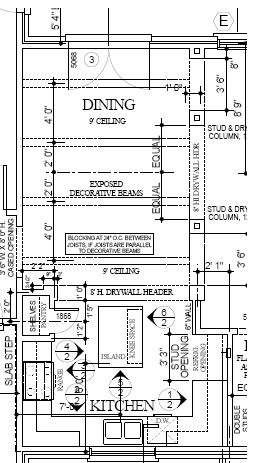
Once your bubble diagram fits, refine it into a rough floor plan. Draw all walls, door swings (arcs showing the swing path—ensure they don't hit furniture!), and window locations. Start placing key furniture to scale (a standard twin bed is ~3'x6.5', a queen is ~5'x6.5', a dining table for six is ~3'x6'). This is where you'll discover if a bedroom is too narrow for a bed and dresser, or if the dining table blocks the path to the kitchen. At this stage, think about structural elements. Where might load-bearing walls be? (Generally, they run parallel to the ridge of the roof and are often on the exterior or central spine). You don't need to engineer them yet, but avoid putting huge spans of open space (like a 30' great room) without considering support beams or trusses. This sketch is your first true test of feasibility and function.
Step 4: Embracing Digital Design – The Modern Draftsman's Toolkit
Top House Plan Software for the DIY Designer
This is where your rough sketches become precise, professional-looking plans. The market offers tools for every skill level.
- SketchUp Free/Pro: The industry favorite for its intuitive, push-pull 3D modeling. It's exceptional for visualizing spatial relationships in three dimensions. The learning curve is moderate, but countless free tutorials exist. The free web-based version is powerful for basic planning.
- Sweet Home 3D: A fantastic, free, open-source option. It's less flashy but incredibly practical for 2D floor plans with simultaneous 3D viewing. Its drag-and-drop furniture library is vast and includes real-world items.
- Chief Architect Home Designer Suite: A more robust, consumer-level version of professional software. It offers extensive libraries of cabinets, fixtures, and building materials, and handles complex roof designs well. It's a paid product but offers a free trial.
- Floorplanner & Planner 5D: Web-based and very user-friendly, great for quick iterations and sharing. Planner 5D has beautiful rendering options for visualizing your design in realistic settings.
Key advice: Start with a free tool to learn the basics of dimensioning and layer management before investing in premium software. Your goal is to produce clean, dimensioned drawings, not necessarily photorealistic renders (though that's a nice bonus).
Mastering the Essential Features of Design Software
Regardless of your chosen tool, you must become proficient in a few core functions. Layers are your best friend. Create separate layers for walls, doors/windows, furniture, electrical, and dimensions. This allows you to hide/show elements as needed. Dimensioning is non-negotiable. Every wall length, room size, and distance between key elements (like countertops and appliances) must be clearly dimensioned. Learn to use the dimension tool accurately. Symbol libraries for doors (swinging, sliding, pocket), windows (double-hung, casement, fixed), and fixtures (toilets, showers, sinks) are pre-made in most software; use them consistently. Finally, master the roof tool. Generating a proper roof pitch and overhang that matches your chosen architectural style is a technical hurdle but essential for the overall form. Spend time on YouTube watching specific tutorials for your software—it's the fastest way to learn.
Step 5: The Non-Negotiable Framework – Building Codes and Regulations
Understanding Zoning Laws and Building Codes
This is the phase where imagination meets bureaucracy, and it's critical. Zoning ordinances (set by your city/town) dictate what you can build. They regulate use (residential), height, bulk (square footage and massing), setbacks (how far from property lines you must build), lot coverage (percentage of the lot the house can occupy), and sometimes even exterior materials. You must obtain a zoning determination from your local planning department before finalizing your design. A beautiful plan that violates a 25' rear setback is dead on arrival. Building codes (like the International Residential Code - IRC) dictate how you build. They cover everything from structural integrity (beam sizing, foundation depth), fire safety (egress window sizes in bedrooms, smoke detector placement), energy efficiency (insulation R-values, window U-factors), plumbing (fixture counts, venting), to electrical (outlet spacing, circuit requirements). You don't need to memorize the 700-page IRC, but you must know the key rules that impact your design, such as minimum egress window size (5.7 sq ft, 24" high, 20" wide) for bedrooms or maximum stair riser height (7.75").
Collaborating with Local Authorities Early and Often
The single best piece of advice is to engage with your local building department and planning office early in the design process. Many offer free preliminary consultations. Bring your rough sketches and ask pointed questions: "Is this lot coverage within our zoning?" "What are the specific setback requirements for my district?" "Are there any special flood zone or wetland restrictions?" This proactive approach saves thousands in redesign fees later. Building officials are not your enemies; they are your guides to a compliant, safe home. They see plans all day and can flag a potential issue with a glance. Build this relationship, and you'll navigate the permit process infinitely more smoothly.
Step 6: Knowing When to Call in the Cavalry – Professional Consultation
The Distinct Roles: Architect vs. Building Designer vs. Draftsperson
Understanding the different professionals is key to getting the right help at the right cost.
- Licensed Architect: Has a professional degree, extensive training, and is licensed to design any type of building, taking full legal responsibility for the structural integrity and code compliance of the plans. They provide the highest level of creative and technical problem-solving but command the highest fees. Best for complex sites, unique structures, or if you want a single point of responsibility.
- Residential Designer/Building Designer: Often certified by organizations like the American Institute of Building Design (AIBD). They specialize in homes, are highly skilled in code-compliant residential design, and typically charge less than architects (often 3-8% of construction cost). For most custom single-family homes, a talented building designer is the perfect hybrid partner.
- Draftsperson/CAD Technician: Expert in translating designs into technical drawings but generally does not provide design services or take responsibility for engineering. They are best hired after you have finalized the schematic design to produce clean construction documents. Rates are lower, but you must have a fully vetted design first.
Your strategy: Use your DIY skills to develop the schematic design—the overall concept, floor plans, and exterior elevations. Then, hire a building designer or architect to produce the construction drawings (full set with structural details, electrical plans, etc.) and stamp them for the building permit. This saves the most money while ensuring code compliance.
Hiring a Consultant for Complex Structural or Site Challenges
Some elements are not DIY. If your design includes a large, unsupported span (like a 25' great room), a complex roof with multiple pitches and valleys, or you are building on a difficult slope (requiring a walkout basement or extensive grading), you will need a structural engineer. They calculate loads, specify beam sizes, and design foundations. This is a non-negotiable for safety and permit approval. Similarly, if your site has tricky drainage, septic limitations, or is in a wildfire or flood zone, a civil engineer or site planner is essential. Budget for these specialist consultations as part of your professional review phase. It's a small price to pay for a structurally sound and legally buildable home.
Step 7: Finalizing, Reviewing, and Preparing for Construction
The Critical Professional Review (Even for DIY Plans)
Before you submit anything to the building department, have your complete set of construction drawings reviewed by a licensed professional—ideally the same building designer or architect you plan to hire for stamping. This is a paid "plan check" service. They will scrutinize every dimension, detail, and code reference. They will catch issues like inadequate header sizing over windows, missing fire blocking in wall cavities, or incorrect stair riser/run ratios. This pre-submit review is your final safety net. It prevents the building department from issuing a long list of corrections, which can cause weeks of delays and costly redesigns. Think of it as an insurance policy for your project timeline and budget.
Preparing the Final Permit Set and Moving Forward
Once professional review is complete and revisions are made, your designer/architect will produce the final permit set. This typically includes: Site Plan, Floor Plans (all levels), Exterior Elevations (all sides), Building Sections (cutaway views showing structure), Framing Plans, Roof Plan, and Typical Details (window/door schedules, stair details). This set, once stamped with the professional's license seal and signature, is what you submit to the building department. The permit process itself can take weeks to months, depending on your jurisdiction's workload. Use this time to finalize contractor bids, secure financing, and order long-lead items (windows, doors, special-order materials). Your meticulously crafted plans are now the central document for all construction activities, guiding every nail, pipe, and wire.
Conclusion: Your Dream Home, Designed by You
Designing your own house plans is a profound act of creation that blends art, science, and pragmatism. It demands research, patience, and a willingness to learn new skills, but the reward is a home that is functionally perfect and emotionally resonant—a place no architect could design without your intimate input. The journey follows a clear arc: dream and define, research and sketch, digitize and detail, code-check and consult, and finally, review and permit. Remember the hybrid model is your most powerful tool: leverage your passion and vision for the creative schematic phase, and strategically invest in professional expertise for the technical, code-bound construction documents. By respecting the process, communicating openly with officials and consultants, and grounding your creativity in budgetary and regulatory reality, you can successfully answer the question "how can I design my own house plans?" with a resounding, "I did." Now, pick up that pencil, open that software, and start drawing the first line of your future home.